What is a campaign voter CRM?
A campaign voter CRM is a customer-relationship-management layer built specifically for voter contact. Instead of tracking customers or donors, it tracks every registered voter the campaign is targeting, and what the campaign has learned about them from canvassing, phone-banking, mailers, or text outreach.
The core records aren't 'leads' or 'contacts.' They're voter rows from the registered-voter file, enriched with campaign-collected fields: support status (support, opposed, undecided, do-not-contact), survey responses, free-text notes, and a follow-up queue. Each subsequent contact decision pulls from that history.
This is a different job from donor CRMs (Salesforce, HubSpot, NGP/EveryAction's donor side) or supporter CRMs (Action Network, NationBuilder's people module). Those are built around relationships the campaign chose to start. A voter CRM is built around the voter universe the campaign has to work whether or not the voter has engaged yet.
Voter CRM vs general CRM vs party-aligned tools
Three categories of tool get called "CRM" in political campaigns. They solve different jobs and most campaigns end up using two of them, not one.
- Generic CRMs (HubSpot, Salesforce, Airtable): great for donors, volunteers, supporters, anyone you have a relationship with. No native voter-file model, no turnout history, no district hierarchy. Trying to use one for 200,000 registered voters means a manual import that goes stale fast.
- Party-aligned voter CRMs (NGP VAN's MiniVAN, i360): full-stack voter-contact platforms some coordinated programs require. Access usually runs through a party or an aligned program, so check eligibility and pricing with the vendor.
- Voter-file workflow tools (VoterFile, PDI, Voter.Vote): built around voter-file targeting instead of a supporter list. VoterFile works with any qualified California campaign (partisan, nonpartisan, ballot measure, school board, water district) on the voter file that campaign is authorized to use.
CRM tied to the voter universe
VoterFile keeps voter CRM work inside the same workflow as segmentation, canvassing, and export. That helps campaigns avoid the common split where targeting happens in one file and contact feedback disappears into another system.
- Per-voter notes and support status
- Survey answers tied to the voter record
- Follow-up queues for field and outreach work
- Voter-level context available before export or next contact
Concrete use cases
What a voter CRM actually does on a working campaign:
- Canvasser knocks a door and records 'strong supporter, will host yard sign', and that note shows up next time anyone in the campaign opens that voter record.
- Survey response from phone bank ('top issue: housing affordability') becomes a filterable field. Next mail piece to housing-issue voters writes itself.
- Campaign imports the county's ballot-return file, and the ballot-status filter narrows the GOTV chase universe to voters whose ballots haven't come back yet.
- Volunteer leaves the campaign; their unfinished follow-ups get reassigned without losing the voter context they collected.
- Final canvass closeout pulls every voter still marked 'undecided after contact' into a targeted mailer.
Useful after the first contact
The CRM layer matters most after the campaign starts learning from voters. Notes, survey responses, support status, and follow-up decisions should change what the campaign does next.
That makes the voter record a working campaign object, not just a row in a file.
Different from donor or supporter CRM
A fundraising or supporter CRM is still useful for donors, volunteers, and public supporters. VoterFile focuses on the voter side: targeted universes, field feedback, survey history, and voter-level follow-up.
Most California campaigns end up using both: a voter CRM for the 50K+ registered voters they need to contact, and a separate donor CRM for the 500-2000 supporter relationships they're cultivating. Trying to make one tool do both usually overpays for whichever side you used less.
Captured screens from voter CRM work
These product captures show how voter review, list building, and plain-language targeting stay connected to voter-level follow-up.
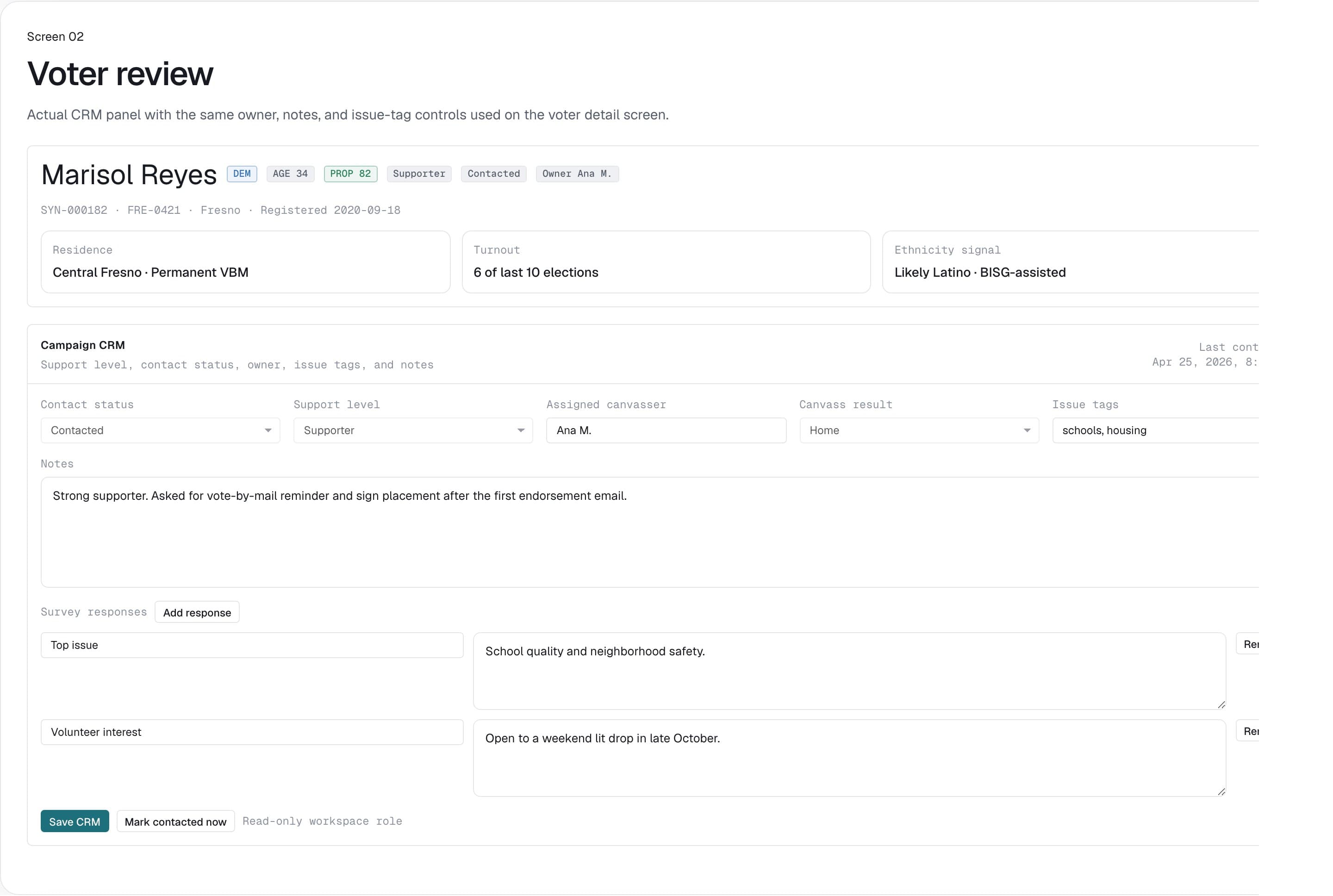
Voter-level review and notes
Review a voter record with campaign context, notes, support status, and signal detail before follow-up or export.
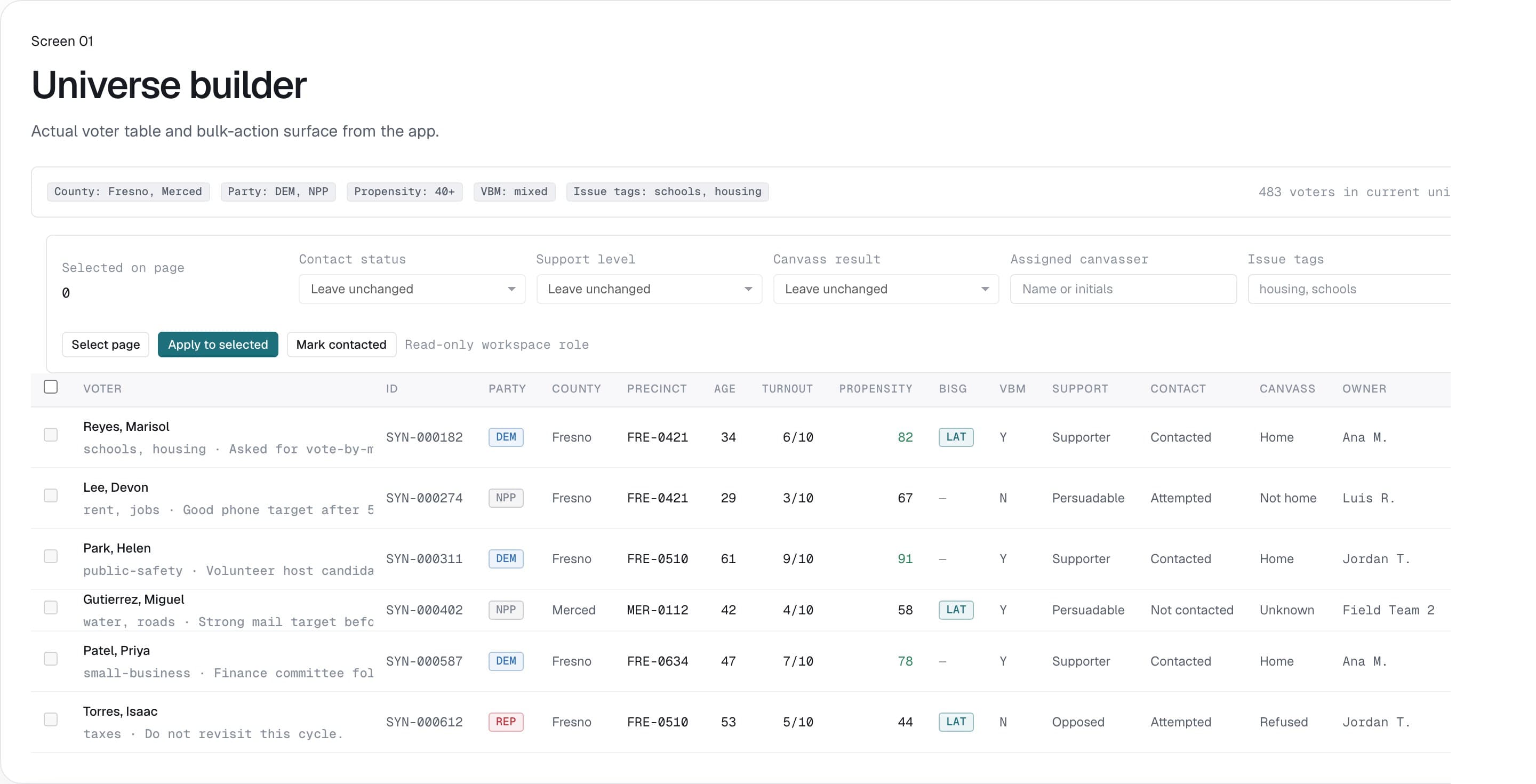
Saved voter universe setup
Filter county, party, turnout, propensity, and workflow criteria before the campaign commits a list to field, mail, or export.
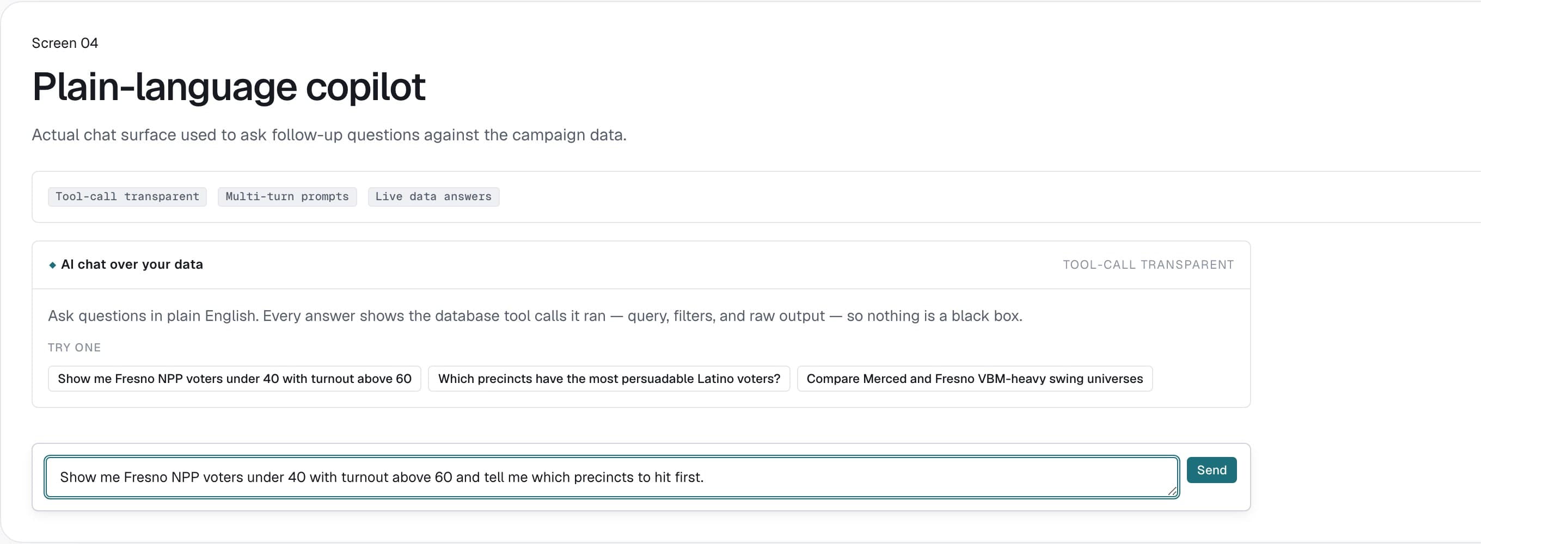
Copilot-assisted filter building
Translate campaign questions into usable voter-file filters without rebuilding every segment manually.
Voter CRM fields campaigns should expect
A voter CRM should preserve the context that determines what the campaign does after voter contact.
| CRM area | What it stores | Campaign use |
|---|---|---|
| Support status | Support, opposition, undecided, or campaign-defined status. | Prioritize follow-up, persuasion, turnout, and exclusion logic. |
| Notes | Field, phone, or campaign observations attached to the voter record. | Keep local knowledge available before the next contact. |
| Survey responses | Structured answers from canvass or outreach scripts. | Report on issues, support, and follow-up needs after field work. |
| Follow-up | Queues or statuses that show what should happen next. | Turn contact history into the next voter-contact decision. |
Complete California access review before any file upload.
Submit the campaign, requester, issuing source, viewer list, geography, and intended use. VoterFile does not open upload, import, browse, export, or voter-level modeled output until the California activation checklist is complete.
Questions
What is a voter CRM?
A voter CRM is a customer-relationship-management tool built around the registered-voter file instead of a list of donors or customers. Each row is a voter; campaigns add notes, support scores, survey responses, and follow-up status to that voter's record. The same data drives the next canvass, mailer, or phone-bank queue.
Is VoterFile a generic CRM?
It includes voter CRM, targeting, field, outreach, and reporting. Donor management, event management, and general supporter relationships can remain in connected fundraising or organizing systems.
How is a voter CRM different from HubSpot or Salesforce?
HubSpot, Salesforce, and similar tools are built for customer relationships you chose to start: leads, deals, donors, volunteers. A voter CRM is built for the registered-voter universe a campaign has to work through whether or not voters engaged first. The data model, the segmentation surface, and the bulk-contact workflow are all different.
Can field responses update voter CRM records?
Yes. Notes, survey answers, support status, and follow-up status from canvassing or phone-bank work attach directly to the voter record and are available before the next contact.
Should campaigns still use a fundraising CRM?
Usually yes. Most California campaigns end up running two: a voter CRM (VoterFile, PDI, Voter.Vote, or party VAN) for the 50K+ registered voters they're contacting, and a separate donor CRM (HubSpot, Salesforce, NGP/EveryAction) for the 500-2000 supporter relationships they cultivate.
What does a voter CRM cost?
VoterFile's voter CRM is included in the $299/race founding pricing. PDI publishes subscription tiers that scale with district size and quotes the biggest districts, and Voter.Vote publishes per-send rates while quoting voter data per campaign. NGP VAN is sold through state parties per cycle, and the public party pricing memos run from a few hundred dollars for a small nonpartisan district up to a few thousand for a legislative one.